Importing a PDF
Most forms already exist: a rental application, a pool key request, a vendor onboarding sheet. Importing reads the PDF, finds its questions and opens the builder with them in place, so you check a draft instead of typing the whole thing in again. Submissions to an imported form can then be written back onto your original document.
Importing is the one part of building a form that costs credits.
Running an import
Import PDF on the forms list.
- Build this form in. Pick the workspace that will own the form and pay for the import. Its available balance is shown underneath.
- Choose a PDF. FormsUI counts its pages straight away and shows the price of this exact file before anything uploads.
- Form name. Taken from the file name, with underscores turned into spaces. Change it if you like; you can also rename it later.
- How should the form be organized? Optional. The import uses this to group questions into sections. Left empty, it follows the pattern of the PDF and combines like things, which suits most forms. Useful when you want something specific, such as "one section per applicant".
- Press
Analyze and build form.
Reading a document takes a while: under a minute for a short form, a few minutes for a long one. Stay on the page until the builder opens.
What it costs
The price depends on the number of pages: a flat price covers the first few, and each page after that adds a little. The import page states the current prices for your workspace, and quotes the total for your file once you choose it. Nothing is charged until you press the button.
| Situation | What happens |
|---|---|
| Your balance covers it | The import runs and the charge is shown when the builder opens |
| Your balance does not cover it | The button is disabled and the page tells you the shortfall. Top up from the Credits page first |
| The file is long or expensive | You are asked to confirm before it runs |
| The import fails | The charge is refunded, and the page says so |
| The PDF has no questions in it at all | An extra charge may apply, to discourage importing documents that are not forms. When it does, the import page says so before you start |
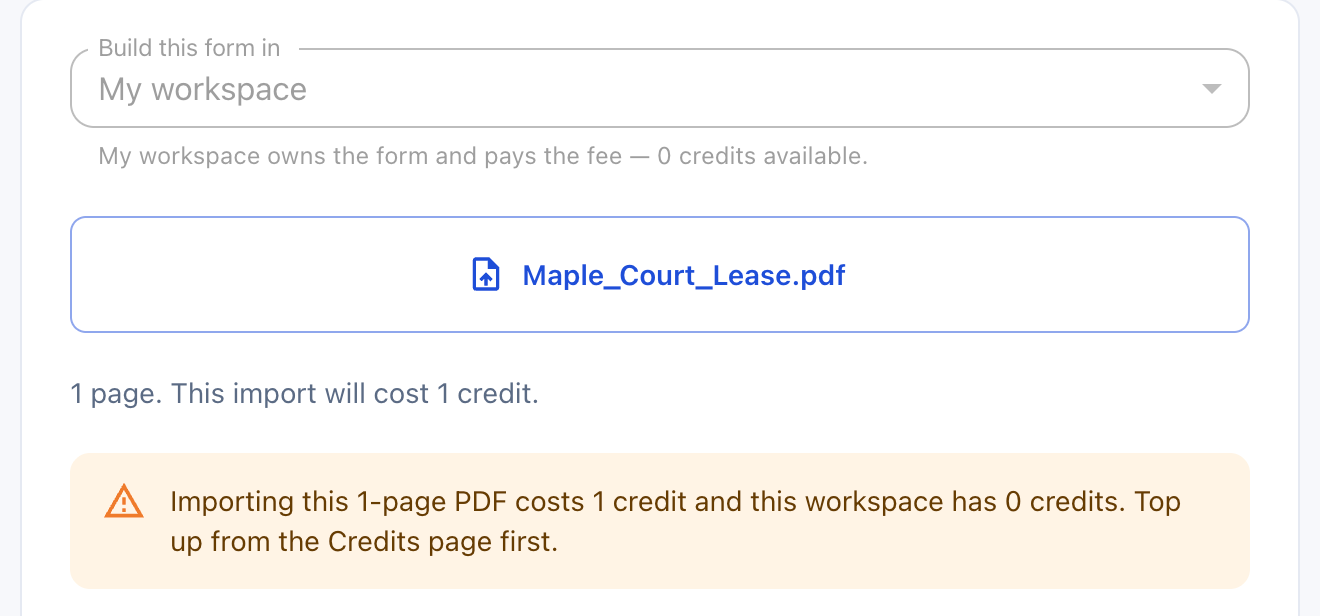 The price is quoted from the page count as soon as you choose the file, and the shortfall is shown before anything uploads.
Import forms, not documents. If you have a PDF to be signed rather than filled in, send it for signature instead.
The page limit
Every workspace has a maximum number of pages per import. A PDF over it is refused the moment you choose it, before any upload and before any charge:
This PDF is (n) pages, and imports stop at (limit).
If your form really is that long, the message links to the Support page. Create a support ticket there and we can raise the limit for your workspace.
What the import detects
| It finds | How it appears in the draft |
|---|---|
| Questions, with their printed labels | One field each, in the order they appear |
| The kind of answer each one wants | A field type: text, paragraph, email, phone, date, number, dropdown or checkbox |
| A cluster of tick boxes for one question (Single, Married, Widowed) | One dropdown with those options, not a checkbox per option |
| A Yes and No pair | One dropdown with Yes and No |
| A lone box to tick, such as an acknowledgement | A checkbox |
| Headings | Sections, which you can rename, reorder or remove |
| Fields the PDF already had, if it was a fillable PDF | Used directly, including their dropdown choices |
| Questions that look sensitive: SSN and tax IDs, government IDs, bank and routing numbers, dates of birth | Marked Sensitive |
| Questions the document marks as needed, for example with an asterisk | Marked Required. Nothing else is |
It also records where on the page each answer goes, which is what lets a submission be written back onto the original.
Check the draft
The import is a first draft, not a finished form. Read it against the PDF before you publish. In particular:
- Required is only ticked where the document said so. Add any others.
- Sensitive is a best guess from the label. Check every question that asks for a number.
- Multiple entries is yours to set. "Vehicle 1, Vehicle 2, Vehicle 3" on paper may be better as one repeatable section. See Building a form.
If the import could not read everything, the builder says so at the top: which pages nothing was read from, and how many questions were left off because a form holds at most 150. Add the missing ones by hand, or split the document and import the rest separately.
After the import
The draft is saved to your workspace the moment the import finishes, so the work you paid for survives a closed tab or an expired session. It starts as a public draft; change that in the builder if you need to.
An imported form has three things a hand-built one does not.
Answers written onto the original
Each submission can be downloaded as your original PDF, same title and same design, with the answers in the printed blanks and the right boxes ticked. An answer with nowhere to go on the page, such as a fourth vehicle on a form with room for three, goes onto an addendum page rather than being dropped. See PDFs of a submission.
Team branding does not touch the original. It still applies to the generated Summary PDF and to any addendum page.
Download fillable PDF
Once the form is saved, Download fillable PDF in the builder gives you the
original document with type-in boxes at the detected positions. Handy for
anyone who would rather fill it in offline.
Check against the original PDF
A panel in the builder that reads the source document again and lists where the form no longer matches it:
| Suggestion | Means |
|---|---|
| Missing | A question on the document that the form never asks |
| Differs | A question whose type, required tick or sensitive tick does not match the document |
Take each one with Add it or Fix it, leave it with Dismiss, or take them
all with Apply all. Nothing changes until you press Save. A missing question
lands with the others in its section, and brings that section with it if the
form does not have it.
The check has a price, shown on the panel, and it is only charged when the form comes back clean. If the check finds anything, or cannot read the whole document, it is free.
Suggestions change a form's questions, so on a published form you have to put it back to draft before you can apply them.