E-signatures
Get a document signed without printing, scanning or chasing paper. FormsUI sends a PDF to everyone who has to sign it, puts each signature on the right line, and tracks each person until the signed copy comes back.
Signatures are collected through SignNow, the signature provider. Signers get an email from it, sign in their browser, and need no FormsUI account to do it.
Two things you can send
| Start from | Use it for | Page |
|---|---|---|
| A PDF you upload | A lease, addendum, SOW, engagement letter, anything already written | Send a document |
| A form submission | Getting someone to sign what they just filled in, such as an application or agreement | Signing a submission |
And when nobody needs to sign, fill out a PDF and download or email the finished copy.
Before you send
A signature send costs credit whether or not the document was right, and fixing a wrong one costs a second send. So everything before Send for signature is free, and worth doing:
| Step | Does | Cost |
|---|---|---|
| Fill in what you already know | Writes the terms, names and dates you know into the document's blanks, so the signer reads them and can't change them. See filling in what you already know | Free |
| Preview | Opens the exact PDF the signers will get, with your values in place. See preview | Free |
| Send it to them to read first | Emails the would-be signers a read-only copy, so "the rent is wrong" comes back while fixing it costs nothing. See send it to read first | Free |
Then send it for signature. Only that step is charged.
What it costs
One send costs one signature, however many people are on it. A two-tenant lease with a landlord's countersignature costs the same as a one-person waiver.
| Action | Cost |
|---|---|
| Send for signature | One signature price per send |
| Verify each signer by SMS | An extra charge per signer, shown next to the option |
| Fill in blanks before sending | Free |
| Preview | Free |
| Send it to them to read first | Free |
| Fill out a PDF, no signature | Priced like a PDF upload, by page count |
| Remind | Free |
Prices are in your workspace's credits and are shown on the page before you send. The send is paid from the workspace you send from, and a send that fails on the provider's side is refunded. See credits and pricing.
Who can send
Anyone who administers the workspace: a CivicPort community's admins, the owner of a personal workspace, or a team's owner and admins. Team members who only fill forms cannot send. See roles.
Where it all lives
Documents in the header is the home for anything that is a document rather than a form. It has two starting points at the top, each showing its price, and below them the list of everything the workspace has sent for signature.
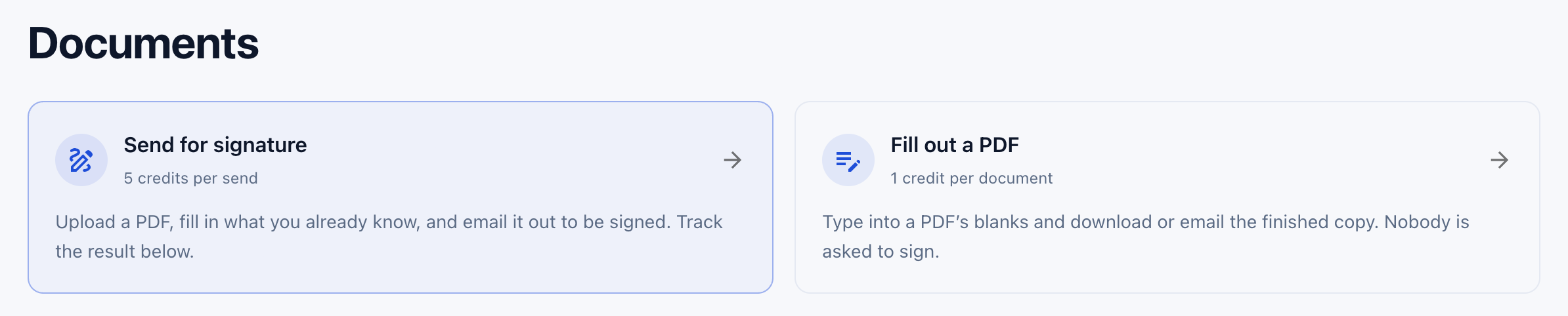 Each card shows its price before you start: a signature send by the send, a filled PDF by the document.
| On the Documents page | Does |
|---|---|
| Send for signature | Upload a PDF, fill in what you know, send it to be signed |
| Fill out a PDF | Fill a PDF's blanks and download or email it, with nobody asked to sign. See Fill out a PDF |
| Sent for signature list | Every document sent, each signer's status, reminders and signed copies. See sent documents |
Sent to me in the header is the other end: documents somebody asked you to sign. See documents sent to you.
Fill out a PDF
Fill out a PDF uses the same blanks as the signature send, writes your values onto the page, and hands back the finished document to download or email, with nobody asked to sign it. It is charged like a PDF upload, by page count. See Fill out a PDF.
Limits
| Limit | Value |
|---|---|
| Signers per document | 10 |
| Document length | Each workspace has a page limit for sending. A longer document is refused before it uploads, and the message says how to ask for the limit to be raised |
| One prefilled value | 300 characters |