Fill out a PDF
Sometimes the filled-in document is the whole job: a resident application with your half already written in, a notice completed for one apartment, a form filled in for one tenant. Nobody needs to sign it and there is no form to build. Fill out a PDF writes your values onto the page and hands the finished copy back, to download or to email.
Start from Documents > Fill out a PDF.
Steps
- Working in. Pick the workspace. The finished document is paid from its credit, and its saved documents are the ones on offer.
- Choose a PDF, or pick one under Or start from a saved document.
- Document title. Names the email and the copy in your Filled PDFs list. The PDF itself is unchanged. It defaults to the file name.
- Fill in the blanks the document leaves.
- How long should the link to this document last? A one-off or kept. See the link.
- Download, or Email the document to up to 10 people.
Reading the document when you choose it is free. If it can't be read, the page still works: the document downloads and sends exactly as uploaded.
Filling in the blanks
The page finds blanks the same way the signature send does: fillable fields
the PDF already has, placeholders such as {{client_name}}, and ruled blanks
after a label. Each is asked for as the kind of answer it looks like, a date
picker for a date, a tick box for a checkbox. See
filling in what you already know
for exactly what is detected.
Anything you fill in or tick is written onto the page itself, not layered on top. Leave a blank empty and it stays empty on the document, so it can still be filled in by hand.
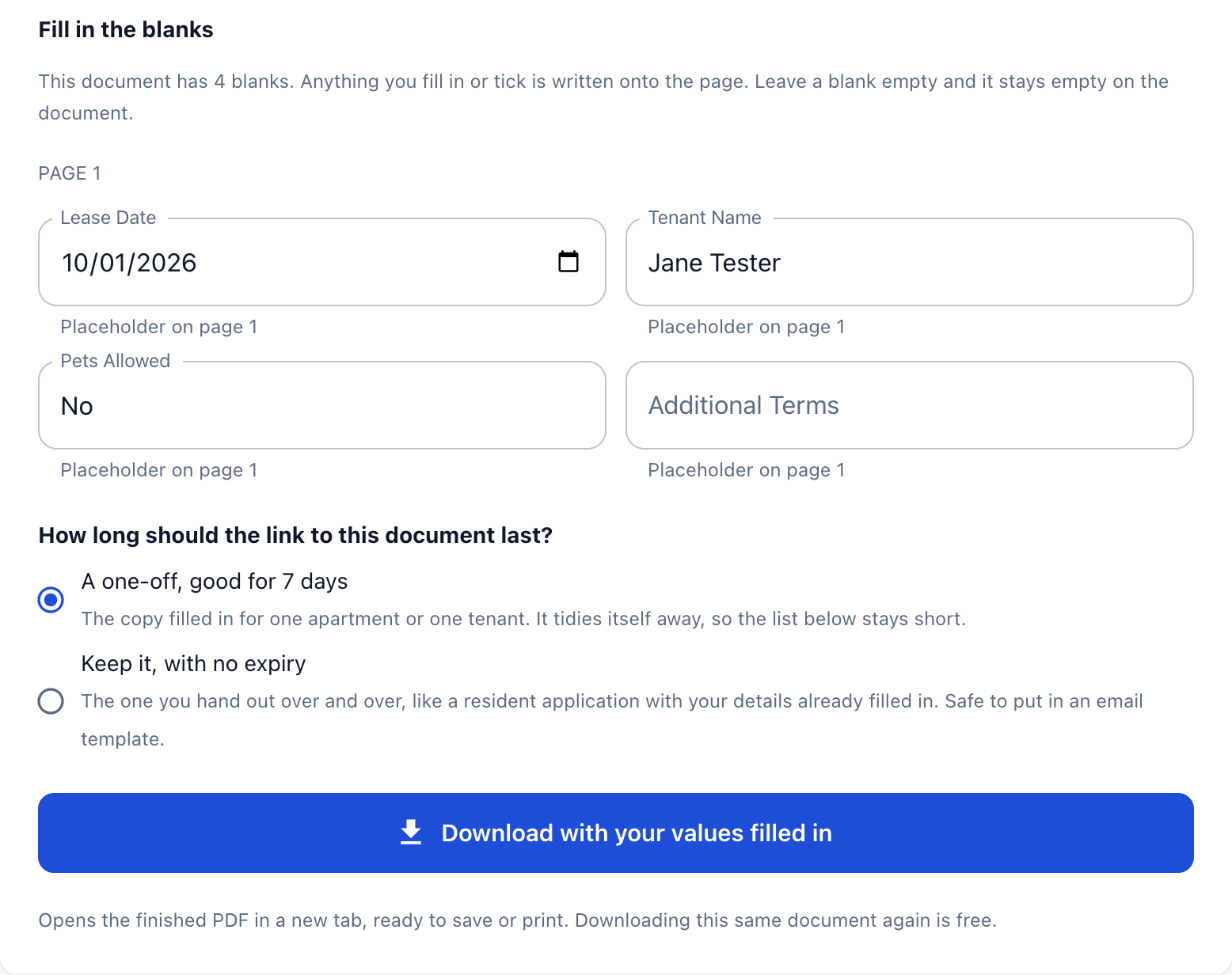 The link question comes before the download, because it is the same question as what the document is for.
If no blanks are found, the page says so. The document downloads and sends as it was uploaded, and costs nothing.
Download
Download with your values filled in opens the finished PDF in a new tab, ready to save or print. The confirmation says what it cost and how much credit is left, and the link to the document appears below the button with Copy.
Downloading the same document again is free.
Email it instead
Add each recipient's email, and a name if you like, with Add another recipient for up to 10. An optional note goes into the email, up to 1,000 characters.
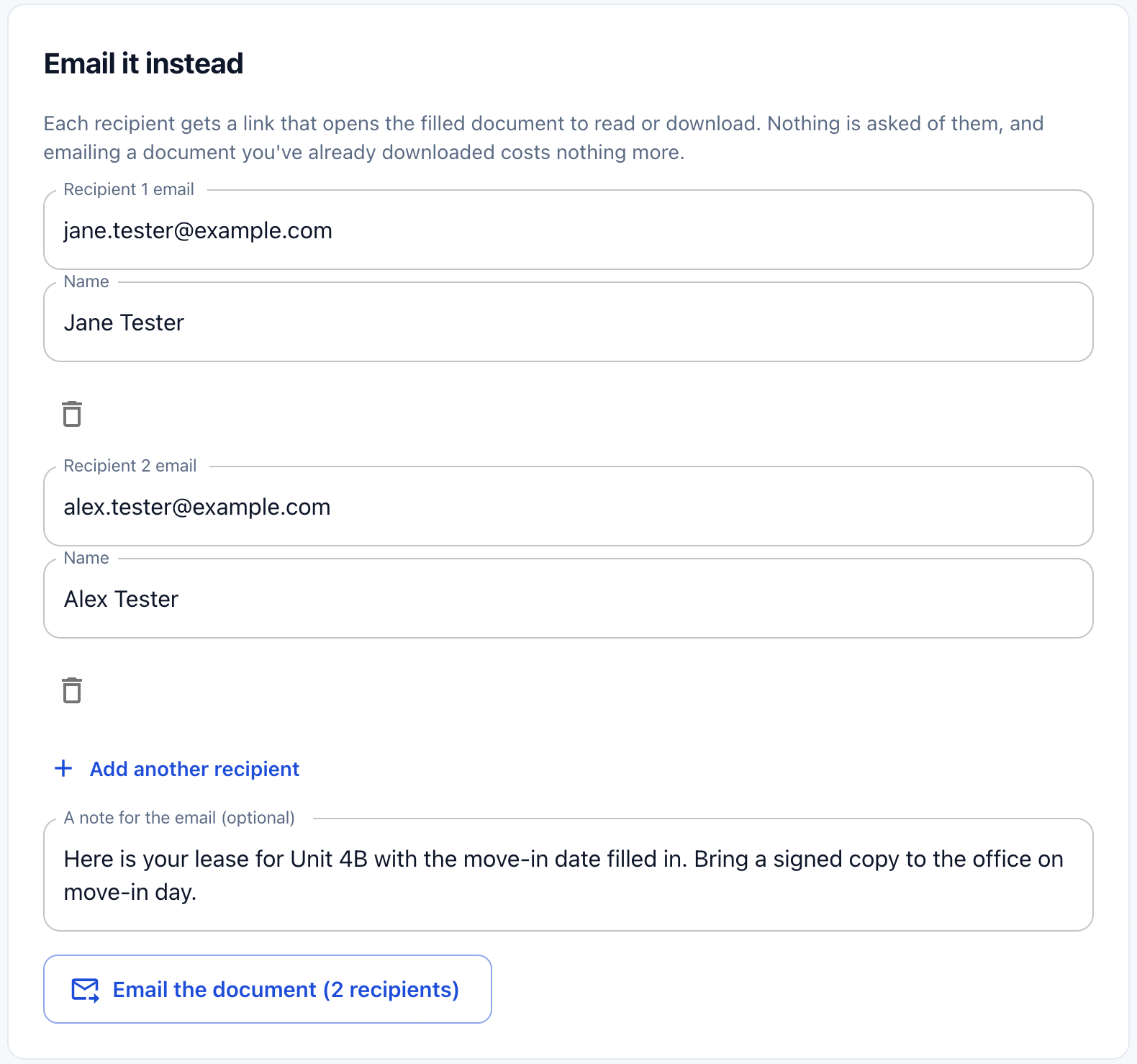 The button counts the recipients, so you can see who will get it before it goes.
Email the document sends each of them a link that opens the filled document to read or download. Nothing is asked of them: no sign-in, no signature. Emailing a document you have already downloaded costs nothing more.
The link
Every finished document gets a link, and the page asks how long it should last before you make it, because the two things people fill in are not the same thing.
| Choice | Use it for | Behaviour |
|---|---|---|
| A one-off, good for 7 days | The copy filled in for one apartment or one tenant | The link and the copy tidy themselves away. The default |
| Keep it, with no expiry | The one you hand out over and over, such as a resident application with your details filled in | Safe to put in an email template. Stays until you stop keeping or withdraw it |
Either costs the same, and either can be changed later from the Filled PDFs list.
Documents with identity details
If your values answer identity questions, such as an SSN, a tax ID, a passport or driver's licence number, an account or routing number, or a date of birth, the copy can't be kept with no expiry, and its one-off link lasts 24 hours instead of seven days.
Filled PDFs
The foot of the page lists what the workspace has filled and still has a link to, newest first. Kept review copies from a signature send are listed here too.
| Column | Shows |
|---|---|
| Document | The title, the date, how many times it has been opened, and who it was emailed to |
| Pages | Its page count |
| Cost | What producing it cost. A dash on a copy that was already paid for |
| Link | Kept, or how long a one-off has left, such as "3 days left" |
| Action | Does |
|---|---|
| Copy | Copies the link |
| Keep | Keeps a one-off, so its link never expires |
| Stop keeping | Lets a kept document lapse in a week |
| Withdraw | Takes it down, so the link stops working for everyone |
Keeping or unkeeping is free: it is the same document you already paid for.
What it costs
A filled PDF is the product, so it is priced like a PDF upload, by page count: a flat price covers the first few pages, and each page after that adds a little. The page states the current prices for your workspace.
| Situation | Charge |
|---|---|
| Download, then email the same copy | Once |
| Download the same copy again | Nothing more |
| The same saved document filled in for a second tenant | Again. Different values make a different document |
| Every blank left empty | Nothing. You get your own file back |
See pricing.
Page limit
Each workspace has a page limit for filling. A longer PDF is refused as soon as you choose it, before it uploads and before any charge. The message links to the Support page, where you can ask for the limit to be raised.
Saved documents
Keep this document for next time saves the uploaded PDF to the workspace, so the next fill can start from Or start from a saved document. Only the document is kept, never the values.
Saved documents are shared with Send a document: one saved lease can be filled out here and sent for signature there. The delete button beside a chosen saved document stops keeping it.
Fill, or send for signature?
| You need | Use |
|---|---|
| A completed document, and nobody has to sign it | Fill out a PDF |
| The same, but signed | Send a document. It has the same blanks, so fill them in there instead |
| Many people to fill in the same document themselves | Import it as a form |